SRS Setup Guide: Skillnad mellan sidversioner
DeadGun (diskussion | bidrag) mIngen redigeringssammanfattning |
DeadGun (diskussion | bidrag) mIngen redigeringssammanfattning |
||
| Rad 75: | Rad 75: | ||
''*Can be changesd in-game if needed'' | ''*Can be changesd in-game if needed'' | ||
====AJS 37==== | ====AJS 37==== | ||
====F-14A/B==== | <b>Control-Tab</b> | ||
</br> | |||
*Bind Radio 1 and 3 to different HOTAS buttons (preferably right and left on a 4-way switch) | |||
<b>Settings-Tab</b> | |||
</br> | |||
Go to PROFILE SETTINGS -> CONTROL/COCKPIT INTEGRATION and Check/Set: | |||
* Radio Switch work as Push To Talk(PTT) = <b>ON</b> | |||
* Auto Select First Channel Preset = <b>ON</b> | |||
* ALWAYS allow SRS Hotkeys = <b>ON</b> | |||
* ALWAYS allow Transponder Overlay Controls = <b>ON</b> | |||
* Allow INCOCKPIT DCS Controlled PTT = <b>OFF</b> | |||
* Rotary Style Frequency Increment/Decrement = <b>OFF</b> | |||
Go to PROFILE SETTINGS -> RADIO EFFECT SETTINGS and set as desired*. | |||
* As a start, set "Enable Ambient Cockpit Effects to ≈ <b>10%</b> or <b>OFF</b> | |||
Go to PROFILE SETTINGS -> AUDIO and set as desired*. | |||
''*Can be changesd in-game if needed'' | |||
====F-14A/B Pilot==== | |||
<b>Control-Tab</b> | |||
</br> | |||
*Bind Radio 1, 2 and "Special Intercom Select & PTT" to different HOTAS buttons (preferably right, down and left on a 4-way switch) | |||
<b>Settings-Tab</b> | |||
</br> | |||
Go to PROFILE SETTINGS -> CONTROL/COCKPIT INTEGRATION and Check/Set: | |||
* Radio Switch work as Push To Talk(PTT) = <b>ON</b> | |||
* Auto Select First Channel Preset = <b>ON</b> | |||
* ALWAYS allow SRS Hotkeys = <b>ON</b> | |||
* ALWAYS allow Transponder Overlay Controls = <b>OFF</b> | |||
* Allow INCOCKPIT DCS Controlled PTT = <b>OFF</b> | |||
* Rotary Style Frequency Increment/Decrement = <b>OFF</b> | |||
Go to PROFILE SETTINGS -> RADIO EFFECT SETTINGS and set as desired*. | |||
* As a start, set "Enable Ambient Cockpit Effects to ≈ <b>10%</b> or <b>OFF</b> | |||
Go to PROFILE SETTINGS -> AUDIO and set as desired*. | |||
''*Can be changesd in-game if needed'' | |||
====F-15E==== | ====F-15E==== | ||
====F-16C==== | ====F-16C==== | ||
Versionen från 2 februari 2024 kl. 14.07
Home >> Technical Guides >> Technical Checklist >> Setup Guide
Default Setup
Start SRS and setup tabs as described below:
General-Tab
- Set Microphone/Speakers as needed
- Set Speaker Boost to something between 10-20 dB or as preferred.
- Set EAM Name (Your callsign)
Settings-Tab
- Check/Set PROFILE = "default"
Control-Tab
- Check that all lines are cleared (Radio 1, Device=None, Button=None etc.). If not, press "CLEAR".
Favourites-Tab
- Name: Master Arms Primary, ServerAdress: SR.MASTERARMS.SE:5002, EAM Coal. Pass: blue
- Name: Master Arms Secondary, ServerAdress: SR.MASTERARMS.SE:5003, EAM Coal. Pass: blue (optional)
Settings-Tab
- Check/Set GLOBAL SETTINGS -> AUTO CONNECT -> Auto Connect = ON
- Check/Set GLOBAL SETTINGS -> MISCELLANOUS SETTINGS -> Auto Select Profile For Aircraft = ON
- Select "COPY PROFILE"
- Name the profile according to table below
- Change PROFILE from "default" to the one you created. (e.g FA-18 if you created a F/A-18C profile)
- Setup profile according to the instructions for Fixed/Rotary Wing below
Profile Names
| Module | Profile Name |
|---|---|
| A-10C II | A-10C2 |
| AJS 37 | AJS37 |
| F-14A/B Pilot | F-14 |
| F-14A/B RIO | F-14_2 |
| F-15E Pilot | F-15E |
| F-15E WSO | F-15E_2 |
| F-16C | F-16 |
| F/A-18C | FA-18 |
| M-2000C | M2000 |
| AH-64D Pilot | AH-64 |
| AH-64D CPG | AH-64_2 |
Fixed Wing
A-10C II
Control-Tab
- Bind Radio 1, 2 and 3 to different HOTAS buttons (preferably right, down and left on a 4-way switch)
Settings-Tab
Go to PROFILE SETTINGS -> CONTROL/COCKPIT INTEGRATION and Check/Set:
- Radio Switch work as Push To Talk(PTT) = ON
- Auto Select First Channel Preset = ON
- ALWAYS allow SRS Hotkeys = ON
- ALWAYS allow Transponder Overlay Controls = OFF
- Allow INCOCKPIT DCS Controlled PTT = OFF
- Rotary Style Frequency Increment/Decrement = OFF
Go to PROFILE SETTINGS -> RADIO EFFECT SETTINGS and set as desired*.
- As a start, set "Enable Ambient Cockpit Effects to ≈ 10% or OFF
Go to PROFILE SETTINGS -> AUDIO and set as desired*.
*Can be changesd in-game if needed
AJS 37
Control-Tab
- Bind Radio 1 and 3 to different HOTAS buttons (preferably right and left on a 4-way switch)
Settings-Tab
Go to PROFILE SETTINGS -> CONTROL/COCKPIT INTEGRATION and Check/Set:
- Radio Switch work as Push To Talk(PTT) = ON
- Auto Select First Channel Preset = ON
- ALWAYS allow SRS Hotkeys = ON
- ALWAYS allow Transponder Overlay Controls = ON
- Allow INCOCKPIT DCS Controlled PTT = OFF
- Rotary Style Frequency Increment/Decrement = OFF
Go to PROFILE SETTINGS -> RADIO EFFECT SETTINGS and set as desired*.
- As a start, set "Enable Ambient Cockpit Effects to ≈ 10% or OFF
Go to PROFILE SETTINGS -> AUDIO and set as desired*.
*Can be changesd in-game if needed
F-14A/B Pilot
Control-Tab
- Bind Radio 1, 2 and "Special Intercom Select & PTT" to different HOTAS buttons (preferably right, down and left on a 4-way switch)
Settings-Tab
Go to PROFILE SETTINGS -> CONTROL/COCKPIT INTEGRATION and Check/Set:
- Radio Switch work as Push To Talk(PTT) = ON
- Auto Select First Channel Preset = ON
- ALWAYS allow SRS Hotkeys = ON
- ALWAYS allow Transponder Overlay Controls = OFF
- Allow INCOCKPIT DCS Controlled PTT = OFF
- Rotary Style Frequency Increment/Decrement = OFF
Go to PROFILE SETTINGS -> RADIO EFFECT SETTINGS and set as desired*.
- As a start, set "Enable Ambient Cockpit Effects to ≈ 10% or OFF
Go to PROFILE SETTINGS -> AUDIO and set as desired*.
*Can be changesd in-game if needed
F-15E
F-16C
F/A-18C
M-2000C
Rotary Wing
AH-64D Pilot
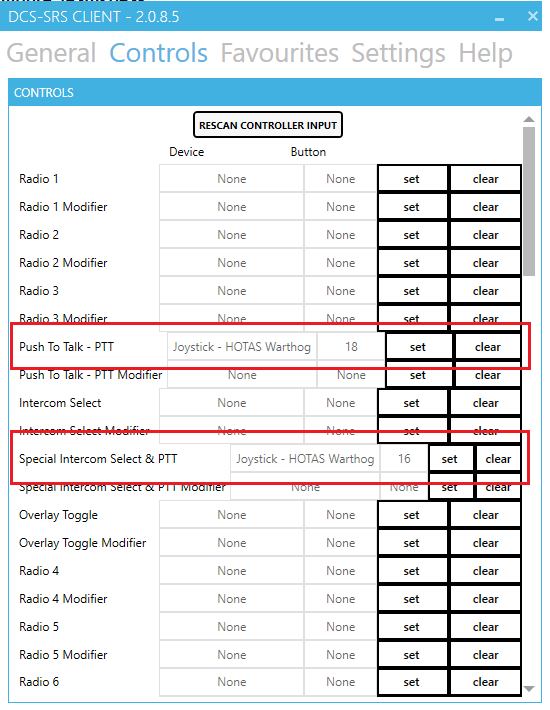
1. Bind "Push To Talk - PTT" and "Special Intercom Select & PTT" to two different HOTAS buttons. (preferably right and left on a 4-way switch with push button)
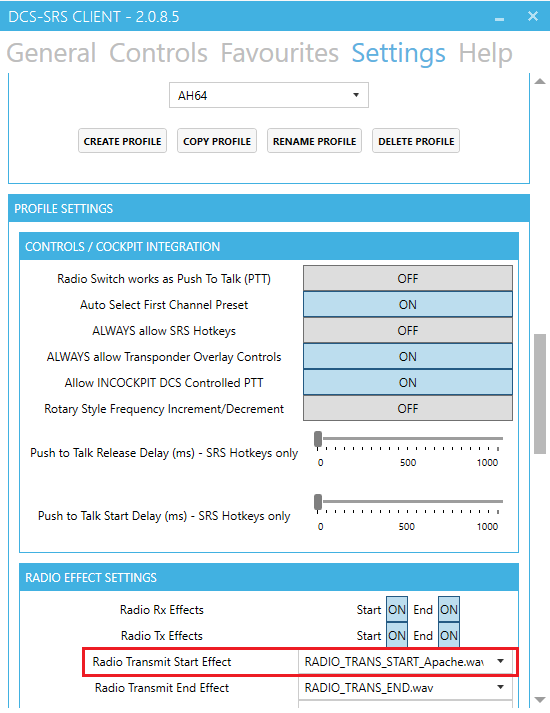
2. Create a profile named "AH64" and setup the options under "CONTROLS/COCKPIT INTEGRATION" as shown above. There is also an option to select an audio file for the PTT in the Apache.
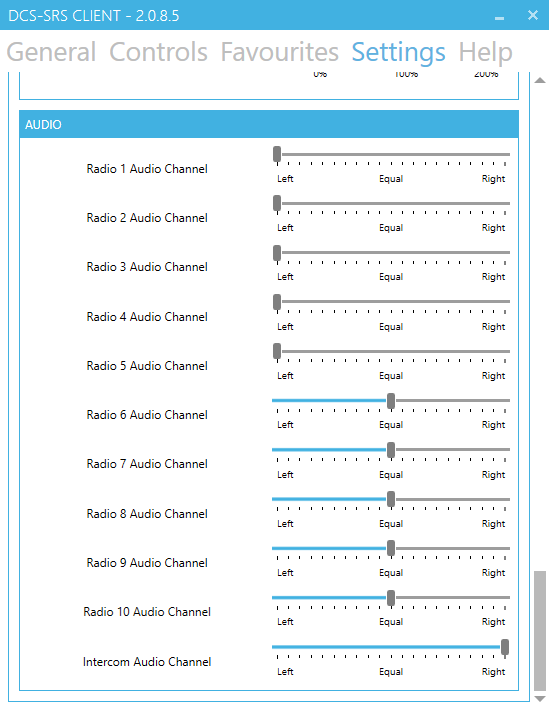
3. It is recommended to balance the radios to be heard on different sides. If you did bind the Intercom in step 1 so you push right, balance the radio to be heard in the right ear. Then if you hear someone talking in your right ear, press right on the switch to broadcast on that radio.

4. In DCS under "control options", bind "PTT/RTS Switch - RTS Depress" (preferably to the same switch as in step 1)


